
Since our TV search technology is used by a lot of comedy TV shows (like Daily Show, Colbert Report, the Soup, Best Week Ever) to expose the follies of government and media, this news caught my eye:


Since our TV search technology is used by a lot of comedy TV shows (like Daily Show, Colbert Report, the Soup, Best Week Ever) to expose the follies of government and media, this news caught my eye:
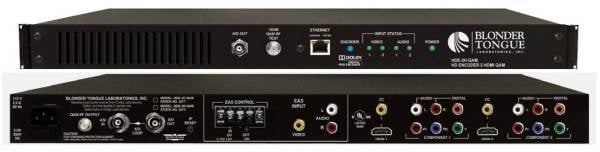
It's been a while since I wrote about how to build your own digital cable (aka QAM) headend.
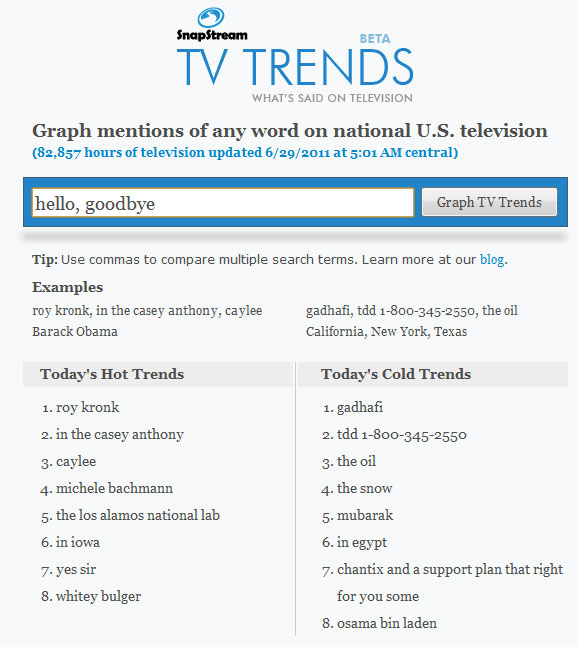
Today, we are saying goodbye to TV Trends. Since launching the free, online service in 2009, we have gleaned tons of valuable insight into what's frequently said on U.S. television. We harnessed SnapStream's powerful TV search technology to record lots of TV and then graph mentions, comparing up to 10 keywords at a time. TV Trends would show you the pulse of national news, listing the top, hot and cold trending phrases from ABC, CBS, NBC, FOX, MSNBC and CNN.

I had the pleasure of being invited to guest speak at IACP’s PIO Mid-Year Conference in beautiful Louisville, KY. Louisville has tons to offer besides the Louisville Slugger factory and Churchill Downs. For example, Fourth Street Live is a vibrant downtown area with shopping, wining, dining and outdoor concerts. Just a stone's throw away, the IACP conference was located at the Seelbach, known as the setting of Tom and Daisy Buchanan's wedding in "The Great Gatsby."

A: Here at SnapStream HQ, we are deeply entrenched in closed captioning since it's a key ingredient in our TV search juice. But every so often, we'll see mistakes in the captions, from a generic typo to a full-blown word massacre. You know, the ones that end up as CC Fails for their inappropriate nature. So is it human or machine error?
It largely comes down to the way the captions were made.
We held a live, interactive demonstration of SnapStream's new Web Player on Thursday, July 7. Now, here's the video recording for your viewing convenience. Or better yet, attend the second live session we are hosting on Wednesday, July 13 at 3:00 PM EDT to get fully immersed in SnapStream 5.3.
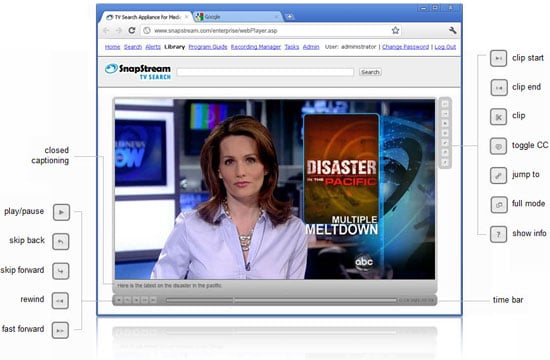
Get a load of SnapStream's first ever Web Player plug-in, now available in version 5.3 for enterprise users. We're very excited about the release of this slick new feature, and here's why: it enables you to play back recorded TV shows and create TV clips in the Web browser. The Web interface formerly played a supporting role to TV Search, but now, it's qualified to take the lead.
Note: SnapStream 5.3 is a free upgrade for eligible1 customers.
Everyone and their mom has a Web browser, so transferring the TV Search experience to a universal platform makes sense for a lot of reasons: it is easier to deploy, provides a more seamless user experience, and so forth.
Now, you can do it all inside the browser: search TV by keyword, play back recorded TV, create TV clips, set up TV Alerts, schedule TV Recordings and so much more! What can't you do that the viewscape can? Stop a recording in progress, full screen mode, volume control, or watch live TV.2
Now everyone in a SnapStream-positive workplace can access TV Search with more openness and ease. Want to share a link to a video you just found? All you need is a Windows computer with Mozilla Firefox, Google Chrome or Internet Explorer.
Upon clicking play for the first time, the Web player plug-in knows to install itself. It's a self-deploying package.3 From there on out, you're good to go. Though it may have been entertaining to watch your IT people run around like beheaded chickens to install new software on every machine in your office, it's just plain cruel.
If you're one of those people who currently uses both SnapStream's Web Admin and Link Client, having everything you need in one interface is going to make your workflow much simpler. You'll never need to switch back and forth between the two.
What else is so awesome about version 5? Read more.
1 Are you eligible? Contact us at support@snapstream.com to determine if your hardware meets the qualifications. This should go without saying, but you also must be a customer in good standing.
2 Live TV will return in the next Web Player release.
3 Your system administrator will need to install the system pre-requisites once per machine.

It's no secret that closed captioning data is mission critical to SnapStream's powerful TV search technology. For the deaf or hard-of-hearing, closed-captioned text provides a critical link to the news, entertainment and information that is contained in the audio portion of a television program. Likewise for SnapStream super users, closed captioning serves an equally important purpose, as the data source for the TV search framework.

Google indexes and searches the dataspace of the Internet. SnapStream indexes and searches the rich information contained in television. It's that simple. Now in our Google Search story, we are searching the internet with the ultimate goal of searching TV — like so many of you are! (Especially those of you who "stumble upon" us at snapstream.com.) When you're on the hunt for a turnkey media monitoring solution... where does Google take you? SnapStream TV Search.